
Tag Archives: IT

Falcon BMS setup on Linux Mint22

Some notes on installing the excellent combat flight simulation “Falcon BMS” on Linux Mint 22.x (currently “xena”, release 3)

Create a new prefix for wine:

mkdir $HOME/falcon_bms_prefix # (for example)

winetricks:

winetricks --self-update
winetricks dotnet40
winetricks dotnet48
winetricks corefonts
winetricks d3dx11_43
winetricks vcrun2022
winetricks dxvk
winetricks d3dcompiler_47

o set virtual desktop

o set emulation to win10

opentrack 2026.1

install from source (word salad machine), optionally with prefix

install files live in

$HOME/src/opentrack/build install

run with

bin/opentrack

wine plugin setup:
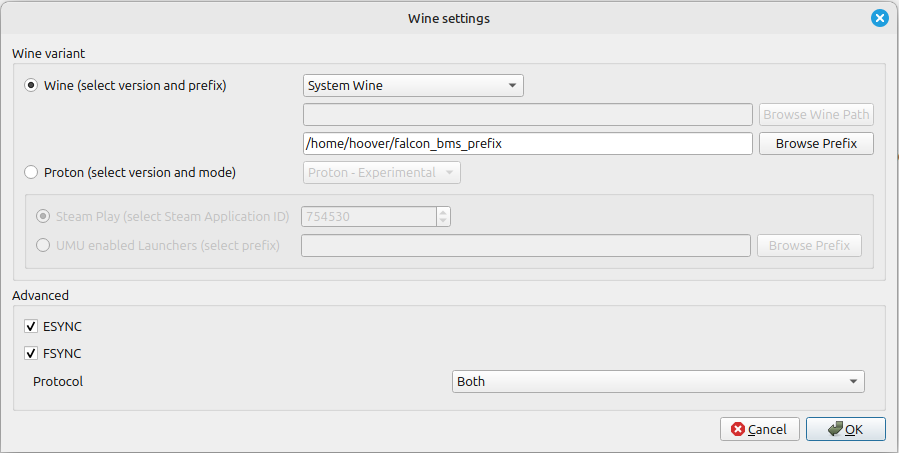
Tracking reset / pause on buttons

falcon BMS control server / client

falcon bms control server working version 0.8 runs under WINE without issues

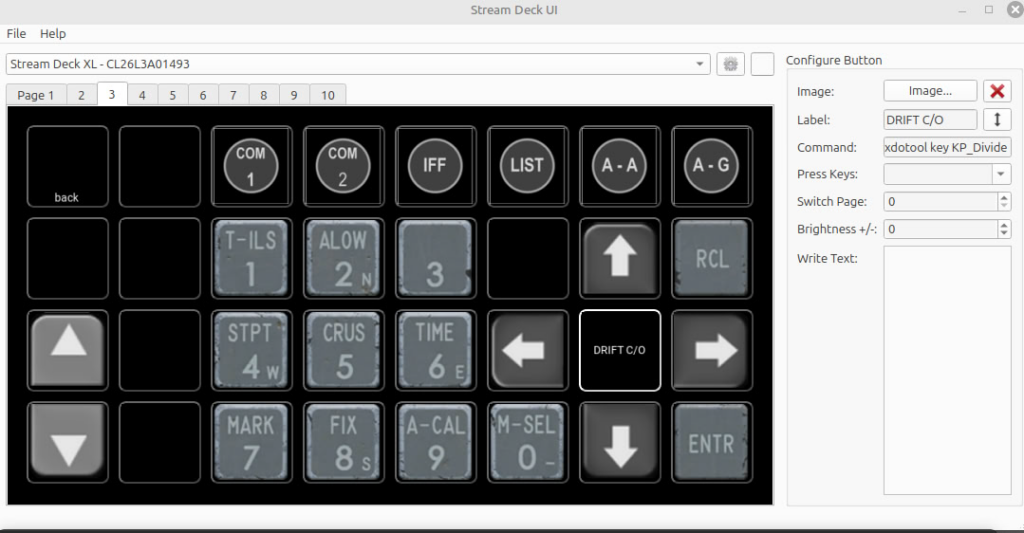
StreamDeck ICP (in progress)

Basic ICP version ready using simple key presses and xdotool where necessary.
https://olaf.uni-graz.at/nextcloud/hoover/index.php/s/byraF8DbR2RnPSF


Rebuilding the SnapAPI module on Ubuntu 24.04 LTS

Sometimes following a kernel update / reboot, the acronis based backup can fail with an error message like this:

“snapapi kernel module not installed”

or similar.

In this case, we have to re-compile the kernel module manually (thankfully, sources are provided by acronis). Here’s how:

o make sure all the necessary packages are installed:

sudo apt-get update
sudo apt-get install --install-recommends linux-headers-$(uname -r) make perl gcc-13

Use another gcc-version if recommended by the supplier.

Now build the kernel modules for the running kernel version (6.8.0-101 in my case, to determine your running kernel version, use “uname -a", “uname -m” or similar):

dkms build -m snapapi26 \
-v 0.8.58 \
--config /boot/config-6.8.0-101-generic \
--arch x86_64 --kernelsourcedir /usr/src/linux-headers-6.8.0-101-generic/

Once the build completes successfully, install the kernel modules:

dkms install -m snapapi26 -v 0.8.58 --config /boot/config-6.8.0-101-generic --arch x86_64 --kernelsourcedir /usr/src/linux-headers-6.8.0-101-generic/

The acronis client services probably won’t pick up on the newly available / loaded module automatically, so it could be prudent to restart the services manually:

systemctl restart acronis_mms acronis_schedule

Now re-try the failed backup which should hopefully complete without any errors (or at least not the error mentioned above :-))

PSA: Other backup solutions are available

Also make sure to check out “Bacula” which is a great, open source and well-supported backup solution available freely (both as in speech and in beer) for all major platforms.

Updating birdnet go from nightly build

use docker ps to find name of running container, say it’s “bobby”

docker stop bobby

docker rm boby

docker rmi ghcr.io/tphakala/birdnet-go:nightly

restart birdnet go using your normal command, i. e.

docker run -d -p 8083:8080 –env ALSA_CARD=1 –env TZ=”Europe/Berlin” –device /dev/snd/ -v /mnt/ssd/birdnet_go/config:/config -v /mnt/ssd/birdnet_go/data:/data ghcr.io/tphakala/birdnet-go:nightly

The new container images should get pulled, extracted and run with the latest nightly build.

If there’s an easier way to update only changed containers please comment below.